
add_action('after_setup_theme', 'theme_support_post_formats');
function theme_support_post_formats() {
   add_theme_support(
       'post-formats',
       array( 'standard', 'aside', 'gallery', 'link', 'image', 'quote', 'status', 'video', 'audio', 'chat' )
   );
}
执行以上代码,在 WordPress 后台编辑文章时,会出现 “文章格式” 选择框,用户可根据内容类型选择对应格式。
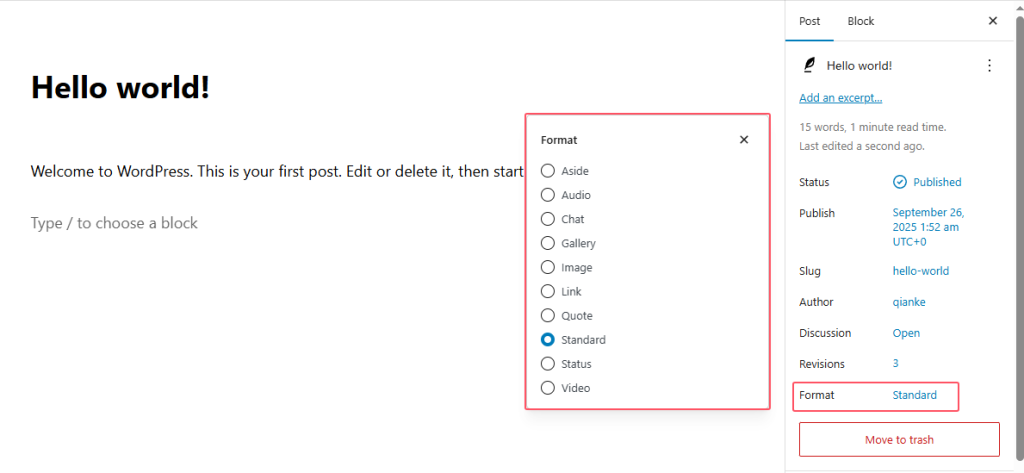
这样既可以针对不同格式编写差异化的模板(如 content-aside.php、content-gallery.php 等)。
例如:文章格式设置为: aside ,则文章定制单篇展示逻辑如下:
在主题根目录新建 content-aside.php,写入针对 aside 格式的内容结构:
<?php
// content-aside.php
while (have_posts()) : the_post();
    echo '<div class="post-aside">';
    the_title('<h2 class="aside-title">', '</h2>');
    the_content();
    echo '</div>';
endwhile;
?>
single.php 会自动识别文章格式并调用 content-aside.php(若存在):
<?php
// single.php
get_header();
get_template_part('content', get_post_format()); // 自动匹配格式,调用 content-{$format}.php
get_footer();
?>也可以让不同格式的文章在前台呈现不同的样式(例如:引用格式可能用特殊边框包裹,图库格式自动排版图片等)。
例如:文章格式设置为:image,则body标签的class类,也会变成相关样式类,方便针对该格式定制样式。
