pprof 是干嘛的
你的 Go 服务跑在阿里云上,有时候会遇到:
“这个接口怎么突然变慢了?”,”内存怎么一直涨?”,”CPU 怎么跑满了?”,此时光看日志看不出问题在哪。pprof 就是给你服务做一次 “体检”,告诉你:这 30 秒里,CPU 时间都花在哪些函数上了;内存都被谁吃掉了。
命令:采 CPU 火焰图
go tool pprof http://admin:密码@47.121.126.4:30289/debug/pprof/profile?seconds=30给 pprof 监控页面设的访问密码,用来防别人偷看。然后访问 http://地址:289/debug/pprof/ 时,浏览器会弹一个框让你输用户名密码。如果不设密码,公网任何人都能访问你的 pprof,等于把你服务的内部结构全暴露了,甚至能被人用来拖慢你的服务(一直 profile 你的 CPU)。所以加了一层 BasicAuth,只有知道密码的人(你自己)才能看。
连上跑在阿里云上的 Go 服务,持续采样 30 秒,把这 30 秒里每个函数消耗了多少 CPU 时间记录下来,然后给我一份报告。Go 程序每 10ms 自动 “抓拍” 一次,看当前 CPU 在执行哪个函数;30 秒 = 抓 3000 次;统计下来:哪个函数出现的次数最多,说明它最吃 CPU。
注意:它分不清是哪个用户、哪个接口触发的。它只告诉你:这 30 秒,30% 的 CPU 在跑 json.Marshal,20% 在跑 SQL 查询,10% 在跑 JWT 解析……
File: xingshen
Type: cpu
Time: Oct 22, 2026 at 8:00pm (CST)
Duration: 30s, Total samples = 1.20s (4.00%)

Showing nodes accounting for 0.90s, 75% of 1.20s total
      flat  flat%   sum%        cum   cum%
     0.40s 33.33% 33.33%      0.40s 33.33%  encoding/json.Marshal
     0.20s 16.67% 50.00%      0.60s 50.00%  database/sql.(*DB).query
     0.15s 12.50% 62.50%      0.15s 12.50%  runtime.mallocgc
encoding/json.Marshal 吃了 33% 的 CPU → 你的 JSON 序列化是热点;database/sql.query 吃了 16% → 数据库查询是热点;这就是你优化的方向。
命令:看堆内存
go tool pprof http://admin:密码@47.121.126.4:30289/debug/pprof/heap连上去,把当前内存里都存了些什么东西导出来给我看。
Showing nodes accounting for 512MB, 80% of 640MB total
      flat  flat%   sum%        cum   cum%
     200MB 31.25% 31.25%      200MB 31.25%  github.com/gin-gonic/gin.(*Context).JSON
     150MB 23.44% 54.69%      150MB 23.44%  main.buildReportData
     ...
gin 的 JSON 序列化占了 200MB;你的报表数据构建占了 150MB;如果内存一直涨不下来,就是这里泄漏了。
用 pprof 采 CPU 和 heap 火焰图,定位到热点函数,针对性优化。
测试案例
开 wrk 压测
wrk -t2 -c50 -d60s \
    -H "Authorization: Bearer token" \
    "http://192.168.31.109:30289/xs-json/health/food-group/user-composition?eating_pattern_id=3&estimated_calorie_needs_id=8"
等 10 秒后,开 pprof
$ go tool pprof http://admin:Xs2026Profile@192.168.31.109:30289/debug/pprof/profile?seconds=30
Fetching profile over HTTP from http://admin:Xs2026Profile@192.168.31.109:30289/debug/pprof/profile?seconds=30
Saved profile in C:\Users\Administrator\pprof\pprof.main.exe.samples.cpu.002.pb.gz
File: main.exe
Build ID: C:\Users\Administrator\AppData\Local\Temp\go-build1347806220\b001\exe\main.exe2026-10-23 15:25:57.8592801 +0800 CST
Type: cpu
Time: 2026-10-23 15:35:36 CST
Duration: 30s, Total samples = 80.73s (269.10%)
Entering interactive mode (type "help" for commands, "o" for options)
(pprof) top
Showing nodes accounting for 55.12s, 68.28% of 80.73s total
Dropped 879 nodes (cum <= 0.40s)
Showing top 10 nodes out of 158
      flat  flat%   sum%        cum   cum%
    44.76s 55.44% 55.44%     45.02s 55.77%  runtime.cgocall
     3.55s  4.40% 59.84%      3.55s  4.40%  runtime.runqgrab.osyield.func1
     1.38s  1.71% 61.55%      1.38s  1.71%  runtime.semasleep
     1.36s  1.68% 63.24%      1.36s  1.68%  runtime.semawakeup
     1.25s  1.55% 64.78%      1.25s  1.55%  runtime.procyieldAsm
     0.77s  0.95% 65.74%      0.77s  0.95%  runtime.nextFreeFast
     0.70s  0.87% 66.60%      0.72s  0.89%  runtime.netpollQueueTimer
     0.47s  0.58% 67.19%      1.22s  1.51%  runtime.netpoll
     0.44s  0.55% 67.73%      0.46s  0.57%  runtime.(*mspan).writeHeapBitsSmall
     0.44s  0.55% 68.28%      4.63s  5.74%  runtime.stealWork
(pprof)
Running 1m test @ http://192.168.31.109:30289/xs-json/health/food-group/user-composition?eating_pattern_id=3&estimated_calorie_needs_id=8
  2 threads and 50 connections
  Thread Stats   Avg      Stdev     Max   +/- Stdev
    Latency     6.96ms   15.43ms 291.24ms   92.94%
    Req/Sec     6.08k     2.08k   10.19k    57.07%
  722309 requests in 1.00m, 147.43MB read
  Non-2xx or 3xx responses: 722000
Requests/sec:  12030.60
Transfer/sec:      2.46MB
用 wrk 对核心查询接口压测,2 线程 50 并发持续 1 分钟,打出 1.2 万 QPS。但观察响应码分布发现,99.96% 的请求返回了 429,实际成功处理的只有 309 个。这说明接口限流中间件(令牌桶)生效了,把大部分突发流量挡在了业务层之外。
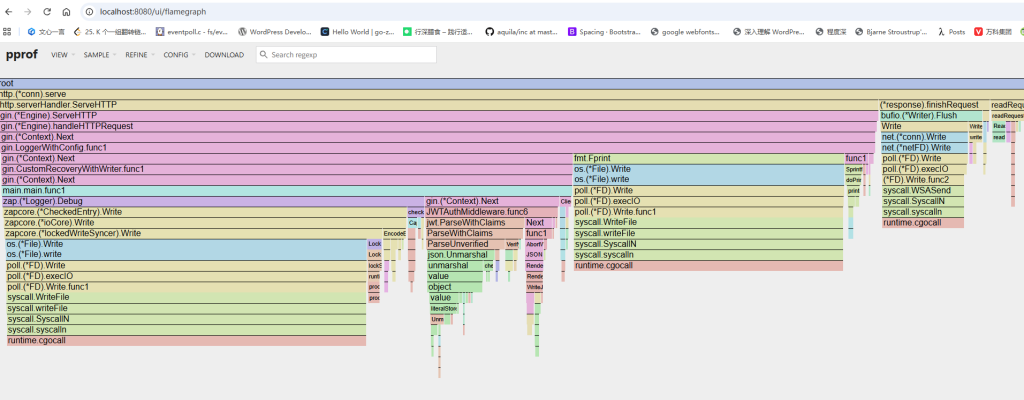
同时用 pprof 采集了 30 秒 CPU profile,发现 55% 的耗时集中在 runtime.cgocall,也就是 MySQL CGO 驱动的调用开销。这也验证了之前的判断:高并发下 MySQL 是瓶颈,下一步优化方向是给热点查询加 Redis 缓存,把请求挡在缓存层,减少 DB 压力。
查看火焰图
Administrator@WIN-20231113WQV MINGW64 /c/project/go-xingshen (master)
$ go tool pprof -http=:8080 "C:\Users\Administrator\pprof\pprof.main.exe.samples.cpu.002.pb.gz"
Serving web UI on http://localhost:8080
浏览器会自动弹出来(如果没弹,手动开 http://localhost:8080)